From first scan
to smoother service.
Guests scan the QR code, browse your menu and place their order directly from their phone — while your restaurant receives everything in one seamless workflow.
Scan the table QR
Guests scan the QR code using their phone camera. No app download is required.
- Fast zero-app native browser loading on iOS & Android
- Automatic table number detection for dine-in orders
Explore the menu
Guests browse a mobile-first bilingual menu with clear categories, dishes and details.
- Instant EN/AR toggle with full Arabic RTL support
- High-resolution dish photos, bilingual descriptions & clear prices


Place the order
Guests add items to their cart and order directly from their phone.
- Order notes and quantity adjustments
- Submit the order directly from the guest phone
Your team receives it
Orders and service requests appear in the restaurant dashboard so your team can respond quickly.
- Live order queue with table markers and status controls
- Table service calls and bill requests tagged with the table ID
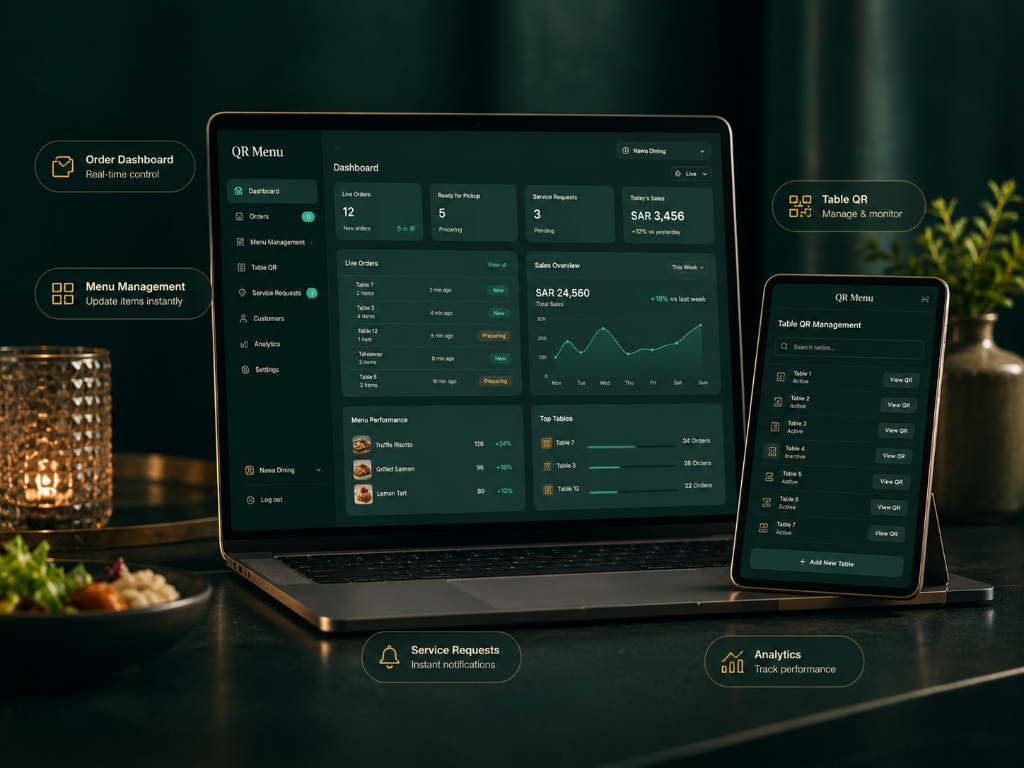
Simple for guests. Clear for your team.
While customers browse and order from their phones, your restaurant manages incoming orders, menu updates, tables and service requests from one place.
Tailored QR for Every Scenario
Choose the QR flow that fits your restaurant: table-specific or universal.
Each table can have its own QR.
When configured for dine-in, the QR can identify the table automatically so guests do not need to enter a table number manually.
- Auto Table Identification
- Direct kitchen routing
Need one QR instead?
Use a general menu QR for counters, entrances, promotions or situations where a specific table is not required.
- Fast price & dish browsing
- Shareable web bio link
Guests can ask without waiting.
Optional service requests let guests call a waiter or request the bill directly from the menu experience.
Ready to see QR Menu in action?
Explore the live menu or request a walkthrough for your restaurant.